
Dub what the computer plays
System audio from any Windows application is captured, resampled and drift-corrected, then dubbed live. No cables, no second machine.
LIVE · Standalone application
Dub anything your PC plays.
Overview
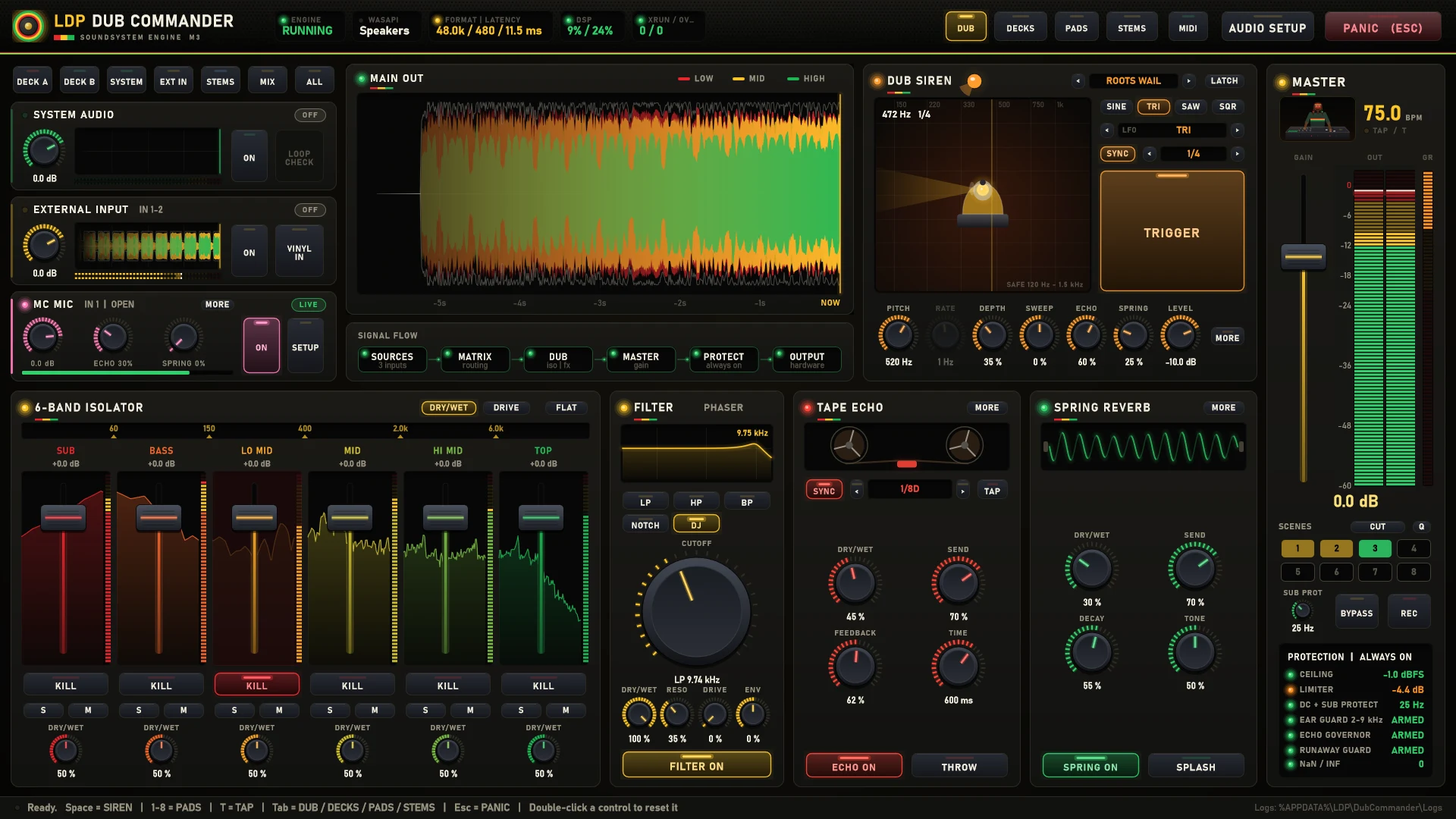
DUB COMMANDER turns a Windows PC into a dub station. It listens to the audio any application plays, to hardware inputs, to two internal decks and to multitrack stems, and sends all of it through one dub console: a six-band isolator, a tape echo, a spring reverb, a filter, a phaser and a siren.
It is built for the end of the chain: a protection stage that cannot be bypassed keeps the output under a fixed ceiling, removes sub-sonic energy and catches feedback before a sound system does.
Every claim on this page comes from the application's own test suite and source. Field listening tests on a full sound system are still in progress, and the product is not released yet.
Status Features marked Implemented are built and covered by automated tests (221 at the latest build). Listening tests on a full sound system are still pending. No public release yet.
System audio from any Windows application is captured, resampled and drift-corrected, then dubbed live. No cables, no second machine.
Two DJ decks with sync and key lock, a stem player that streams from disk, and the dub console — playing at the same time.
A fixed -1 dBFS ceiling, sub-sonic protection, an ear guard against squeals and a feedback probe sit after everything, always on.
How it works
Pick your sources: the sound of any Windows application, a hardware input, the two internal decks or a folder of stems. Several can play at once — ALL puts the decks and system audio on air together.
Everything on air runs through the same console: kill or solo any of six bands, throw into the tape echo, splash the spring, sweep the filter, play the siren.
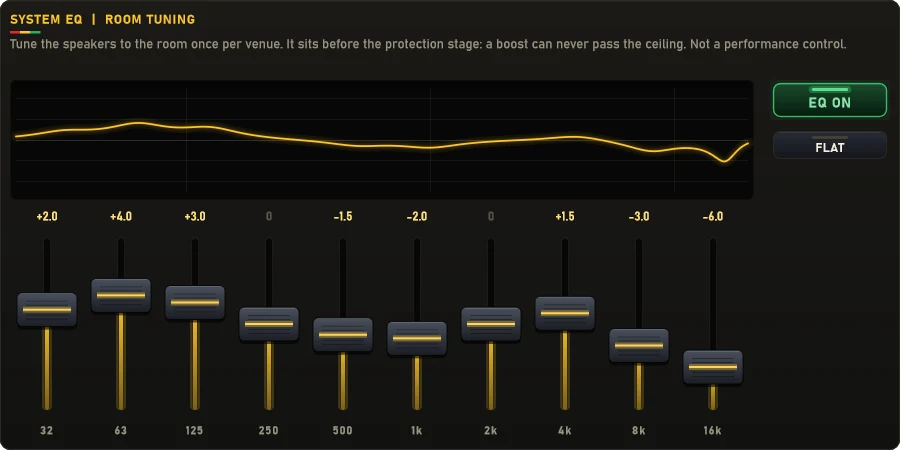
A ten-band system EQ fits the speakers to the venue, and the protection stage after it keeps every peak under the ceiling, whatever happens upstream.
Map every control to a MIDI controller with MIDI LEARN, or plug in a Traktor Kontrol S2 MK3. Store eight scenes and recall them on the beat.
Measured
Every number below is printed by an automated test that passes in the current build. Listening tests on a full sound system are still to come.
Any tune from any app (a streaming player, a browser tab, a DAW) goes straight into the dub console. No cables, no second laptop, no loopback driver to install. The capture follows the sound card's clock drift and checks for feedback loops before it goes live.
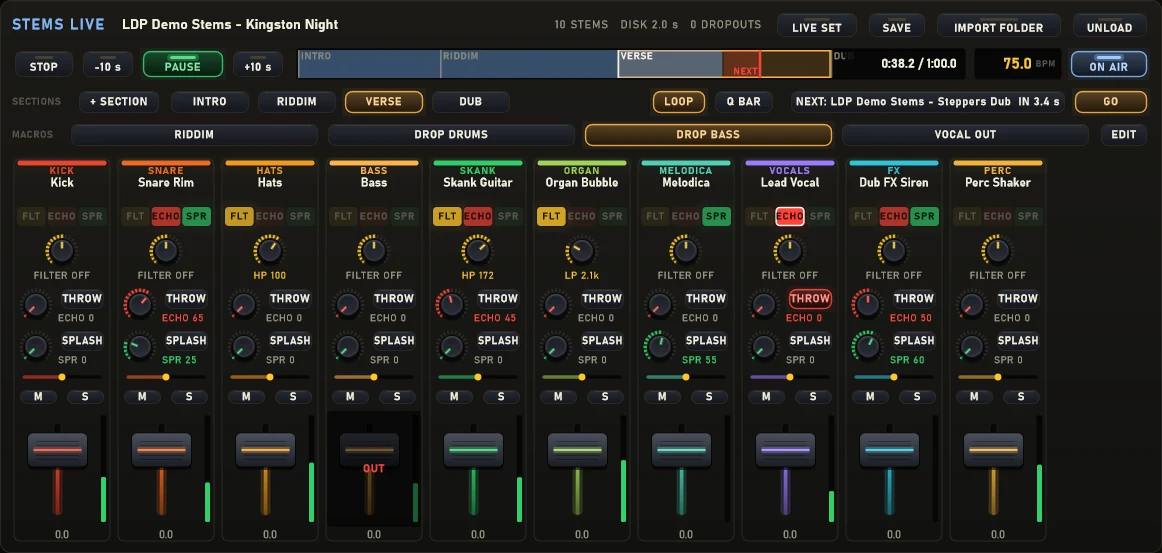
STEMS LIVE finds the tune's tempo, bar 1 and its sections by itself (where the instruments come in and drop out). Press a section and it jumps there on the next bar with no gap; LOOP holds it; four macros take parts out — RIDDIM, DROP DRUMS, DROP BASS, VOCAL OUT (the vocal's last beat flies into the echo). A LIVE SET preloads the next tune and hands over on the bar, cut or ECHO OUT.
STEMS LIVE puts a whole multitrack on faders, streamed from disk, in sync. Each channel is a dub channel: its own DJ filter, its own echo send, its own spring send, and a THROW and SPLASH that fire while you hold them — even with the fader down. Lights on every strip show which effect is on (gold filter, red echo, green spring) and which is being thrown, so you see the dub at a glance.
A −1 dBFS ceiling, sub-sonic protection, an ear guard against squeals, a governor that pulls back a runaway echo, a watchdog, and PANIC on one key (Esc) from any page. There is no switch to turn the protection off.
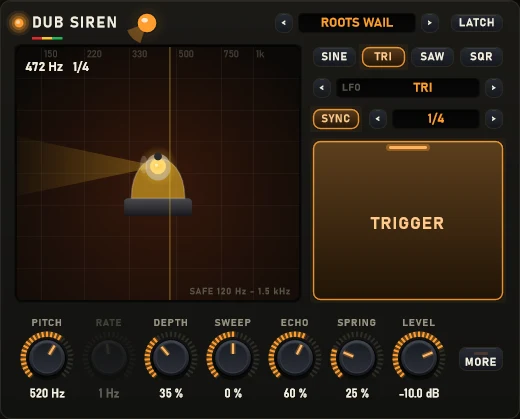
An XY pad: pitch one way, movement the other, eight voices, an LFO locked to the tempo, LATCH, and the Space bar fires it from any page. The pitch is held inside a safe range for the speakers.
Wow, flutter, saturation and a tape-loop feel; THROW while held and the tail rings out over the riddim; synced divisions from 1/16 to a bar. A spring with three dispersive springs and a SPLASH.
A six-band isolator with kill, solo, mute, drive and send on every band and crossovers you drag.
MIDI LEARN on every control with soft takeover, a ready Akai MIDImix profile, and a native dub layout for the Traktor Kontrol S2 MK3 — plug it in and the pads kill bands, SHIFT turns the jog wheels into the siren, the LEDs follow the app. No mapping, no driver hunt.
Features
EvidenceUnit tests for resampling (116 dB SNR) and drift; capture verified on HDMI, onboard and a USB interface. Rig test with streaming audio pending.
EvidenceRecombination and kill-depth measurements in the test suite.
EvidenceFirst repeat measured at 250.02 ms for a 250 ms setting.
EvidenceRT60 measured at 0.57 / 1.59 / 4.9 s; 30 s maximum-settings stability test.
EvidenceSync measured from 126 to 120 BPM with 0.000 ms phase error; a synced deck relocks at once when the master starts (0.0004 ms); tempo detection exact on 9 of 9 test riddims.
EvidenceA jump lands exactly on the bar line and plays the target frame-exact after a 4 ms crossfade, with nothing dropping out; a loop repeats without passing its end; the next tune takes over exactly on the bar; ECHO OUT sends the old tune's last bar, and only that, into the echo; sections found on the bars a rendered arrangement was written on; 64 stems, every one filtered and sending, use about 3 % of real time on the development PC (a 2016 dual-core i3).
Evidence30 s random-abuse test of the whole engine never passes -1 dBFS.
EvidenceFIND MY MIC picks the spoken mic among 16 inputs and a USB device and prefers the direct route when one mic shows up twice; a Windows-device mic reaches the console at its exact level with 96 dB SNR. A growing howl notched 0.1 Hz from its frequency and 18 dB down; 20 s of speech and of singing leave no notch; a simulated mic-speaker-room loop howls without the killer and settles with it. Real-microphone tests pending.
Play a real record through the dub: a turntable or a DJ mixer in, every effect on it, and the echo following its tempo.
Any input pair of your audio interface, or any Windows recording device: a small USB phono box, a controller's or mixer's USB inputs, a laptop jack. PHONO: the RIAA curve for a turntable plugged straight in (measured within 0.02 dB of the standard). Off for a DJ mixer or a turntable on LINE. A rumble filter below 25 Hz, always on with PHONO: the subs feeding back into the needle never reach the effects. TEMPO FOLLOW: the record's tempo is found in its sound in about 20 seconds, so the echo SYNC and the siren follow it. Not DVS: the record itself is the sound. Not yet tried with a real turntable.
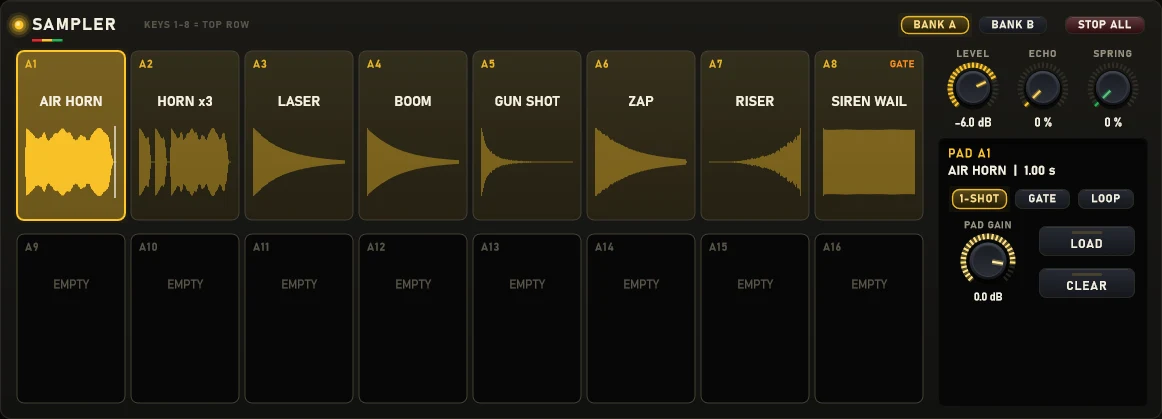
Two banks of sixteen pads with one-shot, gate and loop modes.
Twelve voices, click-free starts and steals; level, echo and spring sends; a built-in sound-system kit; drop your own files on pads.
Eight snapshots of the dub console, recalled on the beat.
Morph cut, 1 beat, 1 bar, 2 or 4 bars of the shared tempo; continuous controls glide, switches change at once; Q starts on the next beat.
A resonant filter with a DJ mode, and a six-stage phaser.
Zero-delay-feedback state-variable filter: LP, HP, BP, notch and a bipolar DJ mode, with envelope follower and drive. Phaser with tempo sync; resonant peaks held under +3 dB at any feedback. The filter and the phaser share one panel with two tabs; the PHASER tab lights while the phaser plays.
MIDI LEARN on every control, with soft takeover.
Every control can be driven by CC or notes; knobs and faders only take over once they reach the current value. Ready profile for the Akai MIDImix and native HID support for the Native Instruments Traktor Kontrol S2 MK3, including its LEDs. A Maschine Mikro profile and automation recording are planned. Plug and play: Pioneer DJ DDJ-FLX4, DDJ-400, DDJ-FLX2, DDJ-200, DDJ-SB3, DDJ-REV1, DDJ-FLX10, Korg nanoKONTROL2 and Akai MIDImix are recognised and mapped on their own input (two controllers never get in each other's way). Built from the makers' MIDI documents, not yet played on every device.
Record exactly what the speakers get, as 24-bit WAV.
The audio thread only copies into a lock-free ring; a separate thread writes the file. A crash loses at most a second. Files continue in a new part before WAV's 4 GB limit; audio the disk could not keep up with is counted and shown, never lost silently. REC CLEAN: record the mix without the room's EQ, for an upload or a release, with the same ceiling.
Ten-band room EQ before the protection stage.
Octave bands from 31.5 Hz to 16 kHz, ±12 dB. A boost can never pass the ceiling. Bit-exact when flat.
Share tempo, scenes and control with other LDP products.
Planned through the shared LDP Link protocol: tempo, scenes and control shared with other LDP products.
Interface
Images marked “Rendered by the application” are drawn by DUB COMMANDER's own code. Click an image for full size; tap the markers for details.
DUB CONSOLE
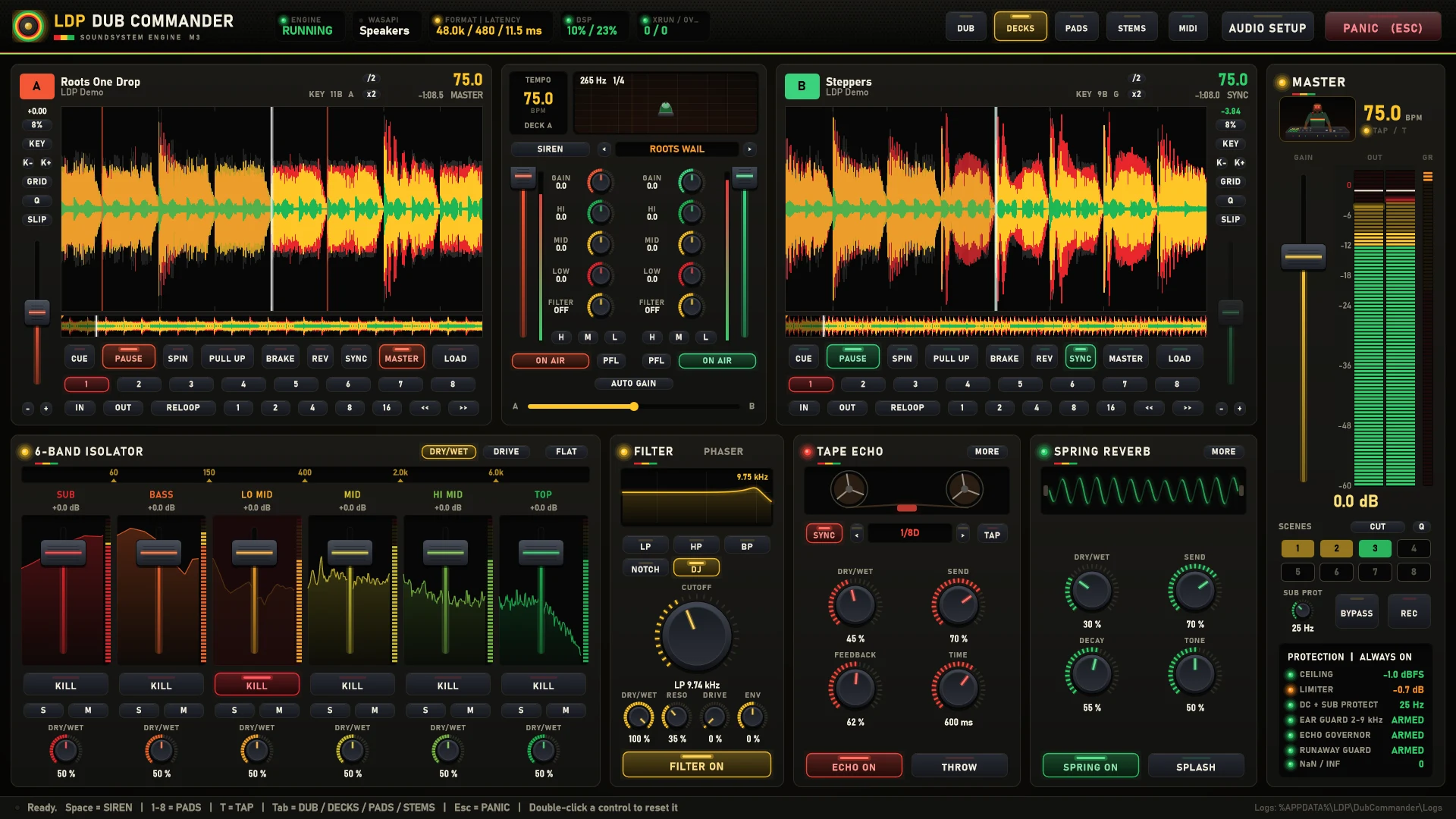
The DUB page: the sources and the MC mic on the left, the live output, the siren, and the dub console below — with MASTER and the always-on protection on the right.
12 interactive markers
MC MIC
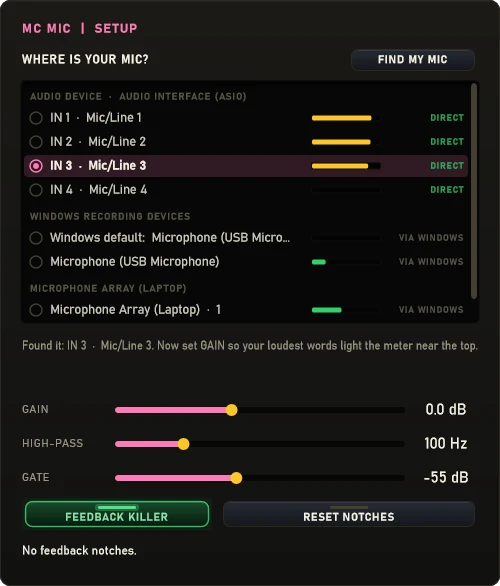
Every input of your interface, a USB mic, a laptop jack, a controller's mic: all listed with a live level. FIND MY MIC listens to all of them at once and picks the one you spoke into. Then a high-pass, a gate and a feedback killer that takes the howls and leaves the voice.
3 interactive markers
CHARACTER
Animations on the TAP and behind the siren pad move with the beat and do their move when you press: the rasta selector rides the desk, the b-boy DABs, the siren light spins — and the lion roars. Right-click to choose; or Minimal for the lightest drawing.

STEMS LIVE
Every stem a dub channel, sections found by themselves and jumped to on the bar, LOOP, four dub macros, and a LIVE SET that hands over to the next tune with an ECHO OUT. Lights show the whole dub at a glance.
7 interactive markers
TWO DECKS
CDJ-style cue, hot cues, loops, key lock and SPINBACK. The master deck drives one tempo for the echo, the siren and the other deck.
5 interactive markers
DUB SIREN
Slide for the pitch, lift for the movement, eight voices, LATCH, and the Space bar on any page.
SAMPLER
A built-in sound-system kit, your own sounds dropped on pads, one-shot, gate or loop, with their own echo and spring.
SYSTEM TUNING
A ten-band room EQ sits before the protection stage, so a boost can never pass the ceiling. It tunes the system — it is not a performance control.
2 interactive markers
DUB COMMANDER on a sound system
A filmed demonstration will appear here once it is recorded on a real system.
Technical specifications
System requirements
Recommended
Capturing only other applications (process loopback) needs Windows build 20348 or later; earlier builds use endpoint loopback.
Final system requirements will be published with the first release.
Formats & integrations
Guides
Download
DUB COMMANDER is in development. Downloads open with the first approved release.
Download unavailableDocumentation & tutorials
Version history
FAQ
A real-time dub station for Windows. It dubs whatever your PC plays — Spotify, YouTube, any app — and its own two decks, stems, sampler and siren, through one dub console (isolator, tape echo, spring, filter, phaser) with a protection stage built for big sound systems.
Not yet. It is in development; this page describes the development build. Follow the development on the Updates page.
Windows 10 and 11, 64-bit. There is no Mac version.
No, it is a standalone application. It does not need a DAW.
A Windows PC and an audio output. For the lowest latency an interface with an ASIO driver; for the headphone cue an interface with four outputs (1+2 to the system, 3+4 to the headphones). A controller is optional.
It is built to be light, and it is developed on a 2016 dual-core desktop processor (Intel Core i3-6100). In a test with two decks, system audio, 32 stems and every effect at once it used 17–27 % of real time on average (with other programs running). We have not measured laptops of that class yet; we will publish those numbers when we have.
Yes. It captures what Windows plays and dubs it live; QUICK SETUP routes Windows audio in one step and puts everything back when you close the app. Apps that use exclusive mode, and DRM-protected streams, bypass the Windows mixer and cannot be captured.
Any MIDI controller via MIDI LEARN (with soft takeover); a ready profile for the Akai MIDImix; native support for the Native Instruments Traktor Kontrol S2 MK3, including its LEDs.
A protection stage after the master is always on: a −1 dBFS ceiling, sub-sonic protection, an ear guard against squeals, a feedback probe, a runaway watchdog and one-key PANIC (Esc). It cannot be switched off. Listening tests on a full sound system are in progress.
Any microphone the computer can hear: an input of your audio interface or mixer (all of them, however many it has), a USB microphone, a laptop's mic jack, or a controller that sends its mic to the computer. Press FIND MY MIC, speak into it, and it is found. A mic on the interface is the lowest-latency route; a Windows recording device adds about 30 ms.
Yes — STEMS LIVE plays a folder of stems from disk, in sync, each on its own fader, into the dub console. Every stem is its own dub channel: a filter, an echo send, a spring send and a THROW / SPLASH you hold, with lights that show which effect is on where. It does not separate a finished song into stems.
Yes. REC records exactly what the speakers get as a 24-bit WAV.
No. Your audio, recordings and settings stay on your computer, and you never need our server to play.
Not decided yet. We will announce it together with the release.
Related