DUB COMMANDER
The MC mic and the feedback killer
Plug in any microphone — an interface input, a USB mic, a laptop jack — let FIND MY MIC find it, clean it up for a loud system, dub the MC's voice, and let the feedback killer take the howls.
- Level
- Intermediate
- Time
- 6 min
- Steps
- 6
- Updated
- Nov 16, 2026
Written from: M3 development build (0.1.0), 2026-11-16. The interface may change before release.
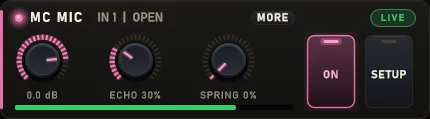
The MC MIC strip sits in the sources column of the DUB page. Plug the microphone in wherever suits your rig — DUB COMMANDER finds it.
Where is your mic? — SETUP
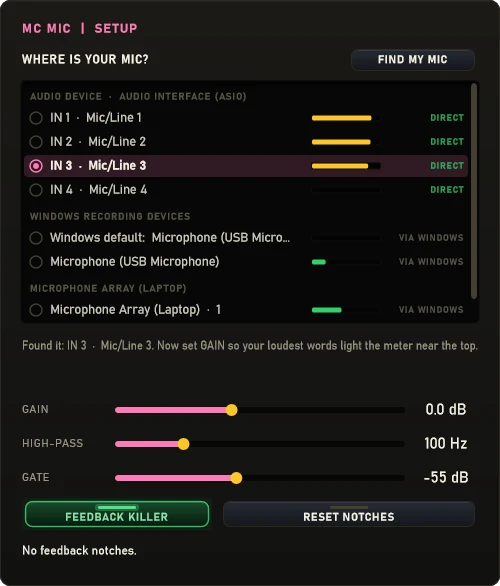
Press SETUP on the strip. The list shows every place a mic can come from, each with a live level:
- AUDIO DEVICE — every input of your audio interface, with the names its driver gives them (IN 1 … IN 16 and more on a big interface or a mixer's USB). DIRECT: the same clock as the output, the lowest latency. Best for a mic on a mixer or an interface.
- WINDOWS RECORDING DEVICES — every channel of every recording device Windows knows: a laptop's mic jack, a USB microphone, a DJ controller or a mixer that sends its mic to the computer. Windows default follows whatever Windows records from (plug a USB mic in and it is used). These run on their own clock and are drift-corrected; they add about 30 ms (shown next to the chosen one).
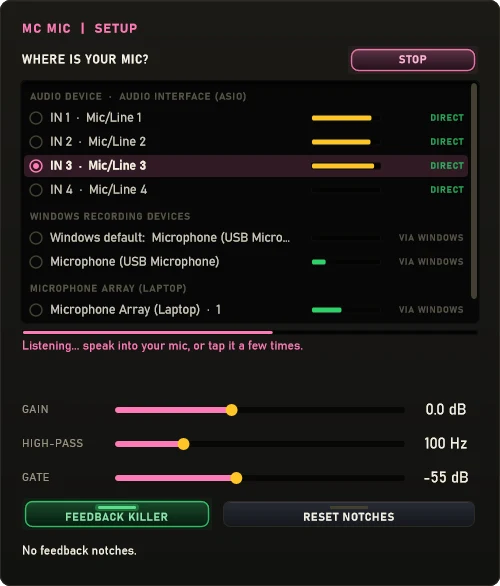
FIND MY MIC: press it and speak into the mic (or tap it) for six seconds. Every input of the interface and every Windows recording device is listened to at once, and the one that moved is chosen. On a mixer that also sends its master to the computer (a stereo pair that carries the voice too), the mic's own channel is chosen, not the master. If two mics moved (two MCs talking), it picks the stronger one and lights the others so you can choose; if the mic was too quiet, it says so — turn up its gain, and a condenser mic needs phantom power (48V). Nothing is recorded: only levels are compared.
Move the mic to another input later? Press FIND MY MIC again. Unplug a USB mic and plug it back in: it comes back by itself. A new install starts on input 1 of your interface, or on Windows' default recording device when the interface has no inputs — on most laptops the mic just works.
Set it up once
- GAIN: so the loudest words light the meter near the top, never red.
- HIGH-PASS: takes handling noise, pops and stage rumble out (100 Hz suits most voices).
- GATE: between phrases the mic drops 40 dB, so the room and the monitors stop feeding it (−80 = off).
- FEEDBACK KILLER on / off, and RESET NOTCHES for a new room.
Play it
- ON: the mic always starts off when the app opens — a mic never surprises a sound system. Switch it on with no mic found and SETUP opens by itself.
- LEVEL, and the ECHO and SPRING sends: dub the MC's last word into the tape echo.
- The pill reads LIVE, OFF, NO INPUT or NOT CONNECTED (a USB mic unplugged); the strip shows where the mic is, whether the gate is open and how many feedback notches are in place.
- Everything on the strip can be played from a controller (MIDI LEARN).
The MC's echo and reverb — MORE
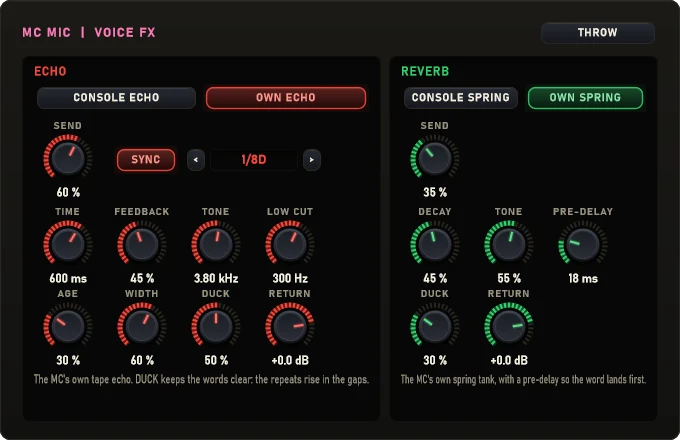
MORE on the strip opens the VOICE FX. For the echo and for the reverb, choose:
- CONSOLE — the MC shares the console's TAPE ECHO / SPRING with the music (the classic way: one tape, one spring, the same TIME and FEEDBACK for everything).
- OWN — the MC gets an echo / a spring of its own: - echo: SYNC and the division (1/8D, 1/4…) or a TIME in ms, FEEDBACK, TONE (darker repeats), LOW CUT (thinner repeats, out of the bass's way), AGE (wow, flutter, hiss), WIDTH (repeats bouncing left and right), RETURN; - spring: DECAY, TONE, PRE-DELAY (the word lands first), RETURN; - DUCK on both: the repeats drop while the MC talks and rise in the gaps, so the words stay clear under a big echo.
- THROW (hold): the whole voice into the echo — the MC's last word, flying. It works on a controller too (MIDI LEARN).
MORE lights while the MC has an OWN effect. The OWN echo and spring run only while something is sent to them, so they cost nothing when unused (about 2.4 % of the processor while both run).
Where the mic sits in the mix
The mic joins the master after the isolator, the filter and the phaser: a kill or a filter sweep never takes the MC away, and the mic is heard in BYPASS too. Scenes never change it.
How the feedback killer works
About fifty times a second it looks at the sound coming out of the mic channel. A howl is a narrow, steady, almost pure tone that sits on one frequency and does not die away; a voice — spoken or sung — always has harmonics around it. When it finds a howl, it puts a narrow notch (−18 dB) exactly there, and deepens it (to −36 dB) if the howl comes back. Up to eight notches stay in place for the night, because a room's feedback frequencies stay the same.
What to expect: in tests a growing howl is caught about a tenth of a second after it stands out and is pulled down 18 dB, and twenty seconds of speech or singing leave no notch at all. A whistle into the mic is a pure tone too, so it may get a notch — RESET NOTCHES clears them.
It is a safety net, not a license: point the speakers away from the mic and keep the monitor sane. Tests with a real microphone on a real system are still to come.