DUB COMMANDER
System tuning and the test tone
Tune the speakers to the room once per venue with the ten-band system EQ, and check the rig with the test tone.
- Nível
- Intermediário
- Tempo
- 4 min
- Etapas
- 2
- Atualizado
- 16 de nov. de 2026
Escrito a partir de: M3 development build (0.1.0), 2026-11-16. A interface pode mudar antes do lançamento.
Open AUDIO SETUP and choose the SYSTEM TUNING tab.
The test tone
- 1 kHz sine: is everything connected, are both sides there?
- 60 Hz sine: do the subs work, are they in phase?
- PINK noise: the whole system at once — walk the room and listen.
Turn the tone on with ON, set its level with the knob (start low). It always starts off when the app opens.
The system EQ
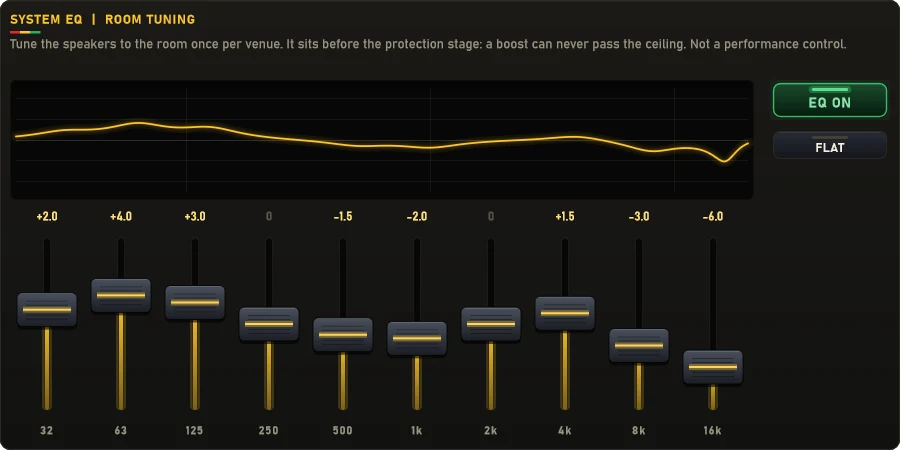
Ten octave bands from 31 Hz to 16 kHz, ±12 dB each, with the resulting curve above them.
- Pull down what booms in the room, lift gently what is missing. Small moves.
- EQ ON compares with and without (a 30 ms crossfade, no click). FLAT resets every band.
- Double-click a slider for 0 dB.
The system EQ sits before the protection stage: a boost can never push the output past the ceiling. It tunes the room, it is not a performance control — it is not part of scenes or MIDI, and it is saved with your settings.