DUB COMMANDER
STEMS LIVE — dub from multitracks
Import a folder of stems, give every stem its own dub (filter, echo, spring, throw), jump between sections on the bar, loop, drop parts with macros and run a live set of tunes.
- Nível
- Intermediário
- Tempo
- 12 min
- Etapas
- 11
- Atualizado
- 16 de nov. de 2026
Escrito a partir de: M3 development build (0.1.0), 2026-11-16. A interface pode mudar antes do lançamento.
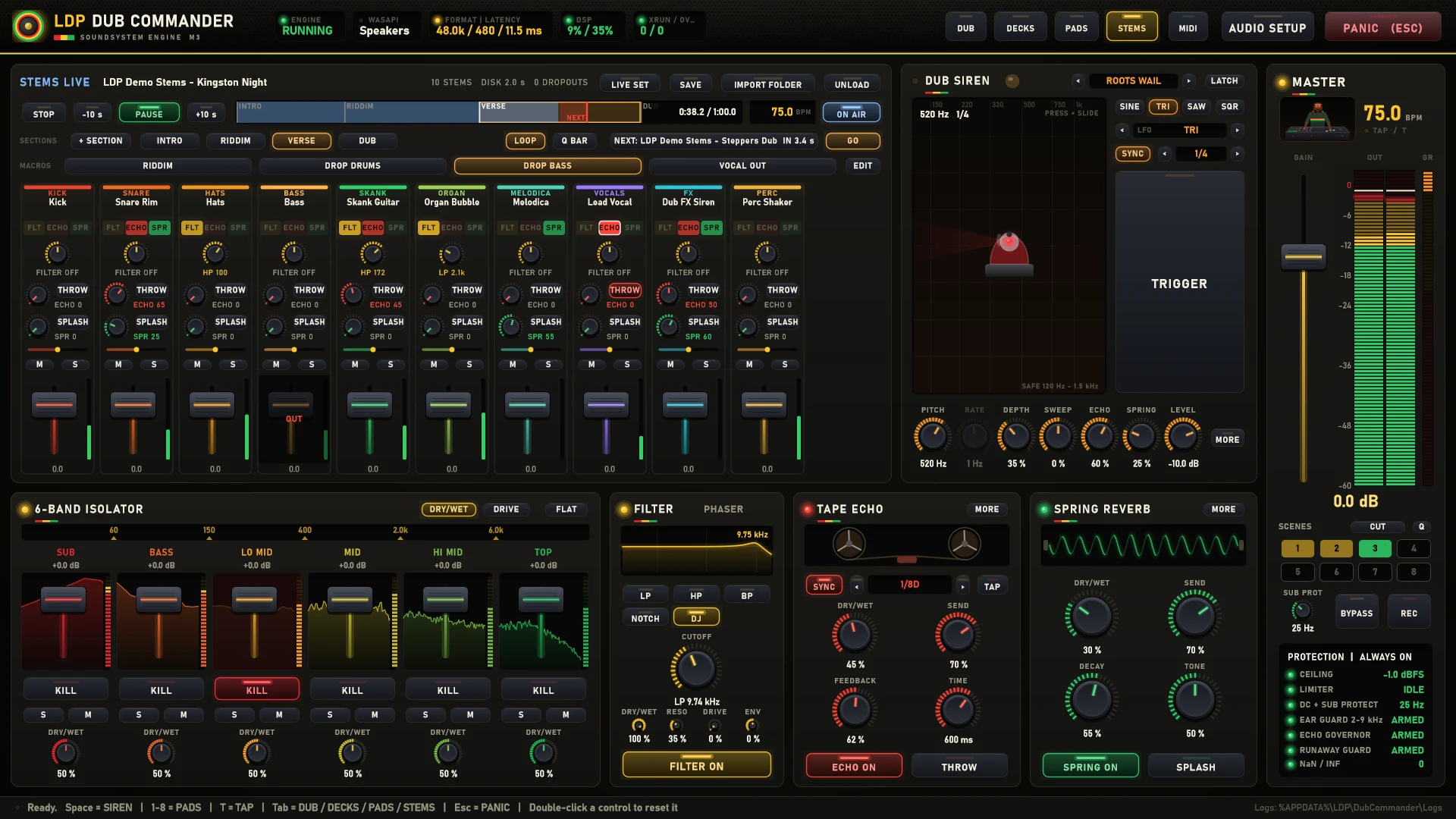
STEMS LIVE plays every part of a tune — kick, bass, skank, organ, vocals, FX — on its own fader, in sync, and sends the stem mix through the dub console. It is how dub was born: the mix as a live performance.
Import
On the STEMS page press IMPORT FOLDER, or drag a folder (or files) onto the page. WAV, AIFF, FLAC, MP3, OGG and M4A are read; the stems may have different sample rates and they still play aligned.
The stems stream from disk with a two-second buffer each — a whole multitrack is never loaded into memory. DISK shows how much is buffered and DROPOUTS counts any moment the disk was late (the stems stay in sync even then).
Names and colors
Each file becomes a strip named from the file name ("03_Bass-DI.wav" becomes "Bass DI") with a category and color: KICK, SNARE, HATS, DRUMS, PERC, BASS, KEYS, ORGAN, PIANO, GUITAR, SKANK, MELODICA, HORNS, STRINGS, SYNTH, VOCALS, BACK VOX, FX. Name your files like that and the strips sort themselves out.
Mix
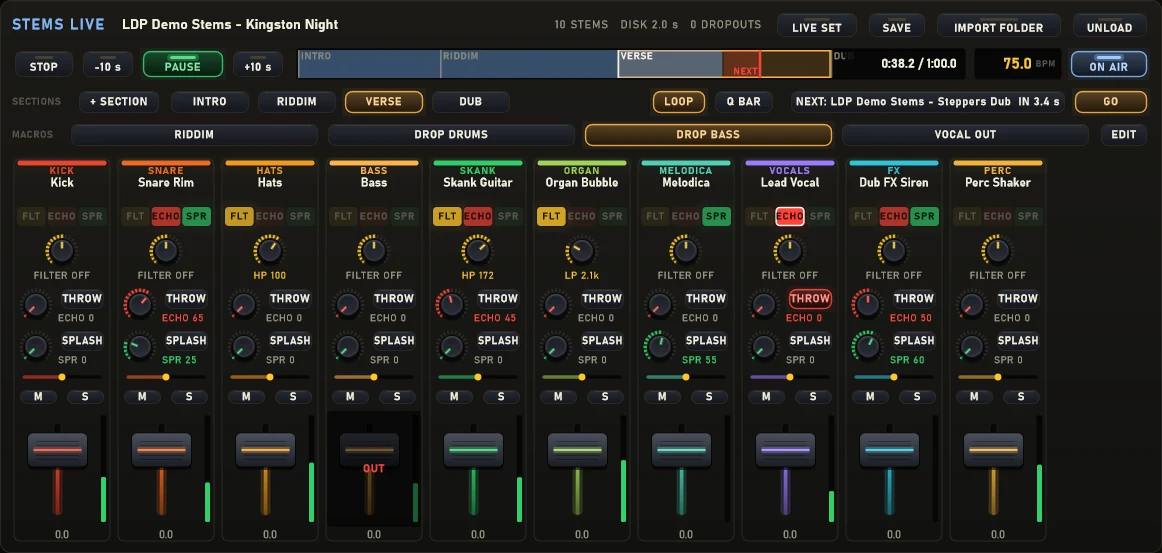
Per strip: M (mute), S (solo — several at once), balance, the fader (0 dB at about 70 % of its travel) and a meter. Transport: PLAY / PAUSE, STOP, −10 s / +10 s and a click on the timeline to jump.
Every stem, its own dub
Each strip is a dub channel, the way an engineer rides a desk:
- FILTER — turn left for a low-pass, right for a high-pass; the center is off. The strip shows where it cuts ("HP 172", "LP 2.1k") or "FILTER OFF". Double-click switches it off.
- ECHO — how much of this channel goes into the tape echo (after its fader).
- SPRING — how much goes into the spring (after its fader).
- THROW (hold) — the whole channel into the echo while you hold it, even with the fader down: pull the vocal's fader down, hold THROW on the last word, and only its echo flies over the riddim.
- SPLASH (hold) — the same into the spring.
Read the mix at a glance. Three lights at the top of every strip show what each channel is doing: FLT (gold) when its filter is on, ECHO (red) when it sends to the echo, SPR (green) when it sends to the spring. A light glows brighter while sound is flowing through it, and a held THROW or SPLASH turns it full and outlined in white.
The sends feed the same tape echo and spring as the DUB page — their TIME, FEEDBACK and DECAY shape every stem's echo at once. The ECHO and SPRING knobs are heard while the console's ECHO / SPRING is ON; a held THROW or SPLASH is heard even with the effect OFF (it wakes the effect for the stems, and its tail rings out). M (mute) silences a channel's sends too; a held THROW still goes.
Tempo and sections — found by themselves
The first time a tune is opened, DUB COMMANDER listens to its stems once, in the background:
- the tempo (from the drums and the bass) and bar 1 — of the four beats, the one the parts come in and drop out on. The tune's tempo drives the console while STEMS plays (the echo SYNC and the siren follow it; a SYNCed deck locks to it), unless a deck is MASTER.
- the sections: wherever instruments come in or drop out (the bass enters, the vocal starts, the drums drop), a section starts — on the bar line, at least four bars apart, up to eight.
The BPM box shows the tempo: drag it up or down to change it (Shift: fine); right-click for BAR 1 HERE (the playhead is on a downbeat), x2, /2. + SECTION adds one where the playhead is (on the nearest bar line); right-click a section to name it (INTRO, VERSE, DUB, DROP…), move it or remove it. The sections also show on the timeline.
Jump, loop
Press a section and the tune jumps there on the next bar — no gap, no click, in time. Q chooses where a jump lands: the next BEAT, the next BAR, or the END of the section playing. A jump on its way blinks.
LOOP repeats the section playing, seamlessly, for as long as you like — the classic way to hold a riddim while the MC or the dub takes over. Press another section while looping and the loop moves with the jump. Without sections, LOOP holds the bar.
How it works: every stem has a second reader that fills ahead from the jump's target, and on the beat the two cross over in 4 ms. Tested: the jump lands exactly on the bar line, the target plays frame-exact, and the music never drops out.
Macros — dub moves on one key
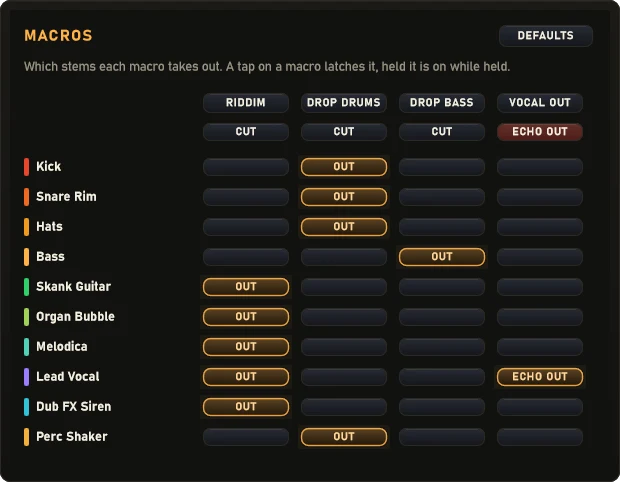
Four keys take parts out of the mix, the way a dub engineer pulls faders:
- RIDDIM — only the drums and the bass play.
- DROP DRUMS — the drums out.
- DROP BASS — the bass out.
- VOCAL OUT — the vocals go, and their last beat flies into the echo as they leave.
They are set up from the stems' categories by themselves. A tap latches a macro (tap again to let it go); held, it is on only while held. Right-click a macro (or EDIT) to choose its stems, its name and whether it CUTS or goes ECHO OUT. A stem a macro holds out shows OUT on its fader; your own M / S stay as they were. Every macro, section, LOOP, Q and GO can go on a controller (MIDI LEARN).
The live set
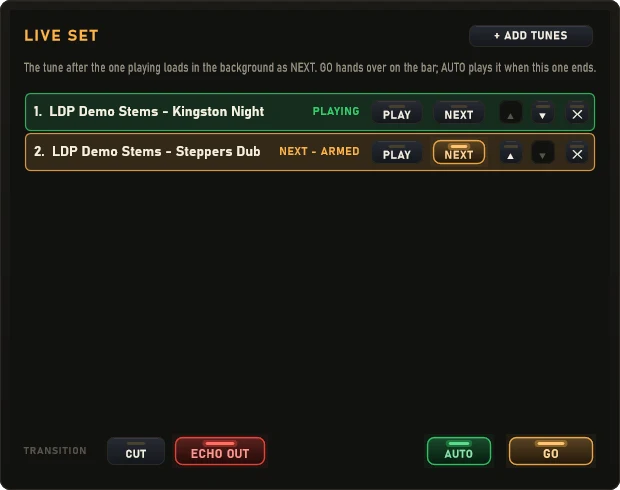
LIVE SET is tonight's running order: add the folders of your tunes (or drop them on the list). The tune after the one playing loads in the background as NEXT — opened, analyzed and buffered — so it is ready the moment you want it.
- GO — the next tune takes over on the next bar.
- CUT or ECHO OUT — ECHO OUT throws this tune's last bar into the tape echo, and the next tune starts under its repeats: the sound-system way to change records.
- AUTO — when a tune ends, the next one plays by itself (the set carries on), and the one after it loads.
The timeline shows where the next tune comes in, and the ECHO OUT bar in red. There is no time-stretching: every tune plays at its own tempo, and the console follows it.
The project — saved next to the stems
What you set up for a tune — its tempo, bar 1, sections and macros — is kept in a small text file next to its stems (folder name.ldpstems), saved by itself. SAVE makes the current mix (faders, balance, mutes, filters, sends) the tune's starting mix. If the folder can't be written, a copy goes to %APPDATA%\LDP\DubCommander\Stems. Open a .ldpstems file (IMPORT or drop it) to bring the tune back; a stem that went missing is listed, the rest plays.
Through the console
ON AIR puts the stem mix into the dub console (PLAY does it for you). From there the isolator, the master filter, the phaser and the siren act on the whole mix, exactly as on the DUB page. Every strip — fader, balance, filter, echo, spring, THROW, SPLASH, mute, solo — and the transport can be driven by MIDI (see Controllers and MIDI LEARN).
Light enough
The stems are streamed by a worker, never by the audio thread. In the tests, 64 stems with every channel filtered and sending used 4 % of real time on the development PC, a 2016 dual-core i3; the second reader per stem costs memory (two 2-second buffers per stem), not processing.